
Photo Upload Requirements Checker
Check a photo or signature against example UPSC, SSC, IBPS, SBI and NEET ranges in KB and KiB, then prepare the right pixel box and JPEG format before you upload.
Exam portal file size checker
Choose a preset and compare decimal (1,000-byte) and binary (1,024-byte) size limits. These are example ranges, not verified current portal rules. Confirm your official notice; dimensions, format and live-photo requirements are not validated.
KB ↔ KiB keeps the number to compare labels. Exact Bytes converts it without rounding. Enter a finite size within exact byte precision.
KB vs KiB risk · 20,000 bytes = 20 KB = 19.53 KiB
20,000 bytes passes one validator but not both, or is too close to a limit. Aim for 20,480–50,000 bytes.
- Preset range
- 20 KB – 50 KB
- Safe byte window
- 20,480–50,000 bytes
- Dimensions
- 3.5 cm × 4.5 cm (about 200×230 px)
The compressor sets a maximum only. Recheck the downloaded bytes against both limits; it does not pad files or set exact dimensions.
Exam photo & signature quick reference
Example ranges only, not official rules. Always confirm the current notice for your exam before uploading.
| Exam / document | Size range | Safe byte window | Dimensions |
|---|---|---|---|
| SSC CGL / CHSL / MTS Passport Photo | 20 KB – 50 KB | 20,480–50,000 bytes | 3.5 cm × 4.5 cm (about 200×230 px) |
| SSC Exam Signature Upload | 10 KB – 20 KB | 10,240–19,900 bytes | 4.0 cm × 2.0 cm (about 140×60 px) |
| UPSC Civil Services / NDA Photo | 20 KB – 300 KB | 20,480–295,000 bytes | At least 350×350 px |
| IBPS / SBI Bank PO & Clerk Photo | 20 KB – 50 KB | 20,480–50,000 bytes | 200×230 px |
| IBPS / SBI Bank Signature (Black Ink) | 10 KB – 20 KB | 10,240–19,900 bytes | 140×60 px |
| NTA NEET / JEE Main Postcard & Passport Photo | 10 KB – 200 KB | 10,240–195,000 bytes | As stated in the current NTA notice |
- 20 KB = 20,000 bytes; 20 KiB = 20,480 bytes. Stay inside the safe byte window to pass both kinds of validator.
- Photo: keep the face centred and follow the background, size and format in the notice. Do not stretch the photo.
- Signature: sign on white paper in dark (usually black) ink as the notice requires, leave a white margin and never crop through a stroke.
Portal validation table
Example ranges for comparison only, taken from the checker presets. The safe byte window passes both a 1,000-byte and a 1,024-byte validator. Always confirm the current notice.
| Portal | Document | Example range | Safe byte window | Dimensions | Prepare with |
|---|---|---|---|---|---|
| UPSC (Civil Services / NDA) | Photo | 20 KB – 300 KB | 20,480–295,000 bytes | At least 350×350 px | 50 KB compressor |
| SSC (CGL / CHSL / MTS) | Photo | 20 KB – 50 KB | 20,480–50,000 bytes | 3.5 cm × 4.5 cm (about 200×230 px) | 40 KB compressorexact pixels |
| SSC (CGL / CHSL / MTS) | Signature | 10 KB – 20 KB | 10,240–19,900 bytes | 4.0 cm × 2.0 cm (about 140×60 px) | 15 KB compressor |
| IBPS (PO / Clerk) | Photo | 20 KB – 50 KB | 20,480–50,000 bytes | 200×230 px | 25 KB compressorexact pixels |
| SBI (PO / Clerk) | Photo | 20 KB – 50 KB | 20,480–50,000 bytes | 200×230 px | 25 KB compressorexact pixels |
| IBPS / SBI | Signature (black ink) | 10 KB – 20 KB | 10,240–19,900 bytes | 140×60 px | 15 KB compressorexact pixels |
| NTA NEET (UG) | Passport & postcard photo | 10 KB – 200 KB | 10,240–195,000 bytes | As stated in the current NTA notice | 40 KB compressor |
| NTA JEE Main | Photo | 10 KB – 200 KB | 10,240–195,000 bytes | As stated in the current NTA notice | 40 KB compressor |
| India Post GDS | Photo & signature | See current notice | — | Published summaries differ between engagement cycles. Use the current GDS online engagement notice; no example range is shown here. | — |
Three checks most upload forms run
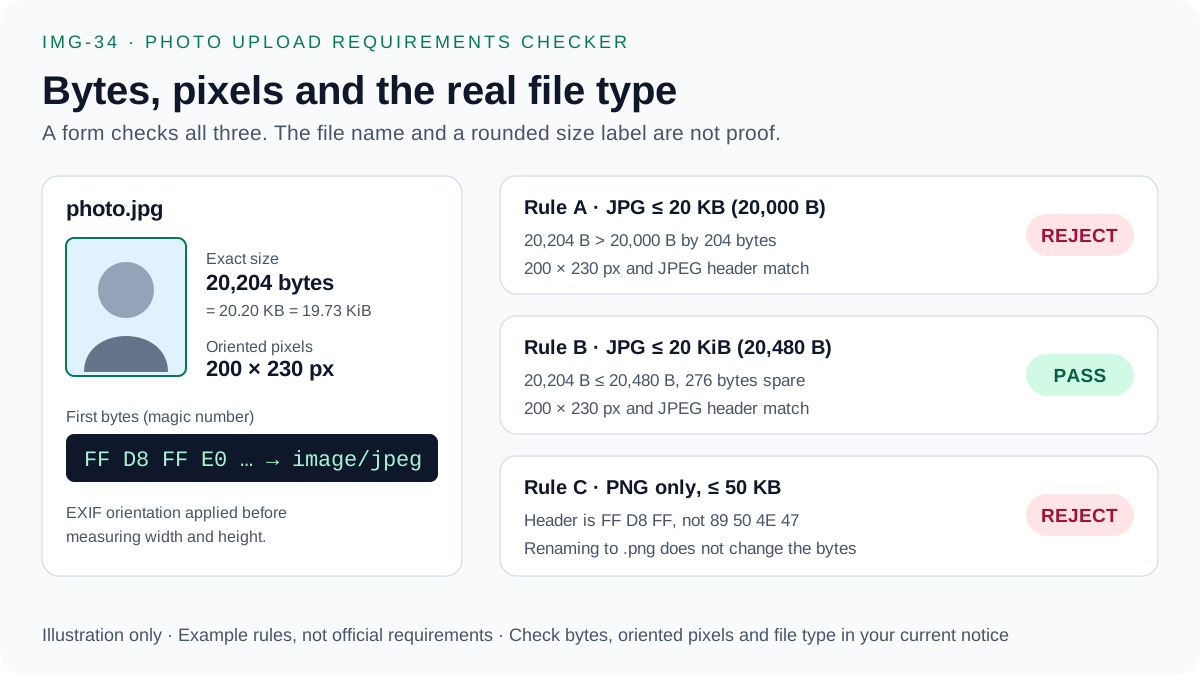
- Bytes: the exact byte count must sit between the minimum and maximum. 20 KB means 20,000 bytes here; 20 KiB is 20,480 bytes.
- Pixels: width and height after rotation, for example 200 × 230 px for many bank and SSC photos. Use the exact-pixel exporter to crop or pad without stretching.
- Format: portals read the first bytes of the file. A real JPEG starts with FF D8 FF; renaming a PNG to .jpg does not convert it. See JPEG vs PNG for online forms.
Print size to pixels, crop fit and JPG vs PNG
Convert a form's centimetre or inch size into exact pixels, see whether your photo needs a crop or a white margin, and compare real measured file sizes by format. Sizes are common examples; confirm your current notice.
1. Print size → exact pixels
276 × 354 px at 200 DPI (0.1 MP). Formula: pixels = round(cm ÷ 2.54 × DPI).
2. Fit your photo into the required box
Centre crop · aspect difference -13.7%
Crop 13.7% of the source to a centred 3000 × 3450 px window, then scale to 200 × 230 px. Keep the face centred; never stretch.
- Centre crop window
- 3,000 × 3,450 px (13.7% removed)
- Fit on white
- 173 × 230 px image, 13.5% margin
- 200 px printed 3.5 cm wide
- ≈ 145 DPI
Exact 200 × 230 px canvas · source crop (sx, sy, sw, sh) = (0, 275, 3000, 3450) → (dx, dy, dw, dh) = (0, 0, 200, 230)
The main compressor reduces bytes and may shrink dimensions. The exact-pixel exporter keeps the canvas at exactly 200 × 230 px, crops or pads on white in your browser, and lowers JPEG quality only.
3. JPEG vs PNG vs WebP under a KB limit
| Format | Measured bytes | Fits 50 KB? | Header bytes | Accepted by forms |
|---|---|---|---|---|
| JPEG ★ | 7,503 | Yes (42,497 B spare) | FF D8 FF | Almost always |
| PNG | 55,093 | No (+5,093 B) | 89 50 4E 47 | Some forms |
| WEBP | 3,110 | Yes (46,890 B spare) | 52 49 46 46 … 57 45 42 50 | Rarely |
Use JPEG: 7,503 bytes fits. Lossless PNG is 55,093 bytes — over the 50,000-byte limit — because continuous-tone photo pixels barely compress without loss.
Portals read the first bytes of the file, not its name. A PNG renamed to .jpg still starts with 89 50 4E 47 and can be rejected; a real JPEG starts with FF D8 FF. Re-encode instead of renaming. Measured on seeded test images (JPEG quality 85, lossless PNG, WebP quality 80).
Frequently Asked Questions
What does a photo upload requirements checker check?
It compares a file size with an example portal range in both decimal KB (1,000 bytes) and binary KiB (1,024 bytes). The table and advisor also show the pixel box and format to prepare. Confirm the current official notice; the checker does not read your notice.
Why does a portal reject a 20 KB photo?
A file shown as 20 KB can contain more than 20,000 bytes, and some validators use 20 × 1,024 = 20,480 bytes. The portal may also reject the file for its minimum size, pixel dimensions, format or header bytes, not only the maximum.
Are these UPSC, SSC, IBPS, SBI and NEET ranges official?
No. They are commonly published example ranges kept for comparison. Requirements change between notices, so check the current notice for your exam before uploading.
Is my photo uploaded when I use the checker?
No. The checker only uses the number you type, and the exact-pixel exporter and compressor process images in your browser. The site uses page analytics as described in the privacy policy.