
Resize Image to 200 × 230 Pixels
Export an exam photo at exactly 200 × 230 px (or a 140 × 60 px signature) by centre-cropping or padding on white, then keep the JPEG within 20 KB–50 KB. Everything runs in your browser.
Exact-pixel photo export (crop or white pad)
Make a JPEG that is exactly the selected pixel size, then search JPEG quality so the file stays at or under your maximum. The photo is never stretched. Sizes are common examples; confirm your current notice.
Choose a JPG, PNG or WebP photo. It stays on this device.
Box 200 × 230 px · Centre crop to fill · example window 20,480–50,000 bytes
Output is always a JPEG (header FF D8 FF) on a white background, so transparency becomes white. The tool checks the downloaded bytes and pixel size; it does not check face position, background colour or live-photo rules.
Crop and pad coordinates, worked out
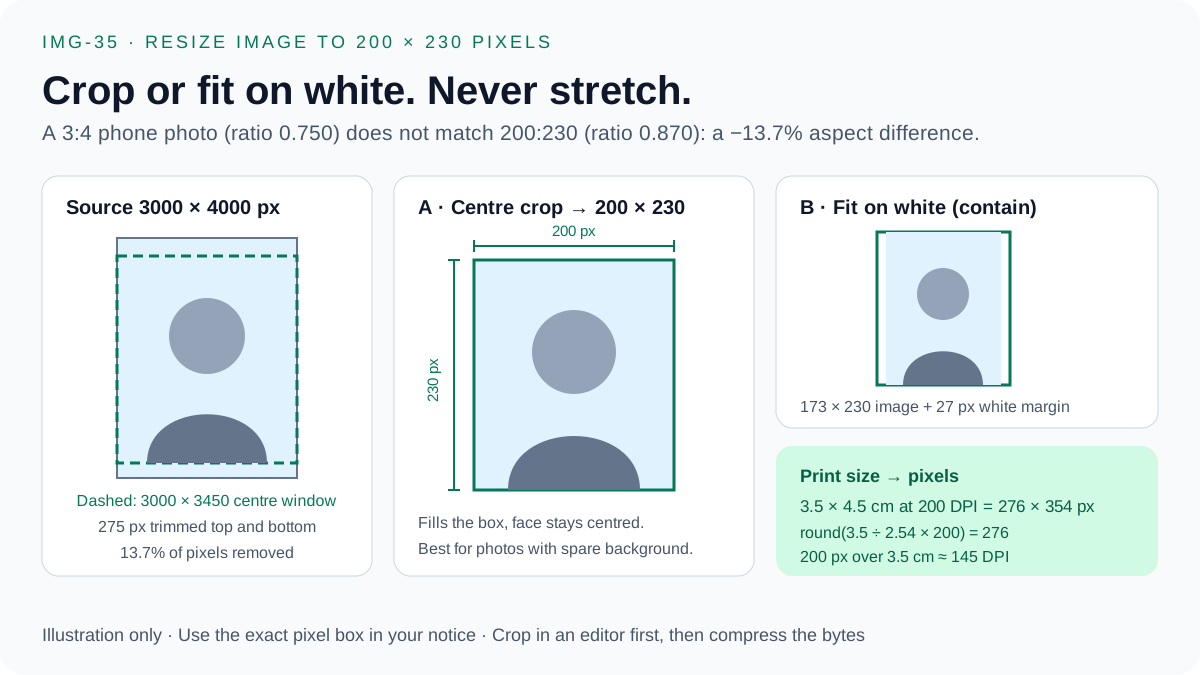
The exporter uses the same calculation shown here. Crop keeps the largest centred 200:230 window; pad fits the whole image inside the box and fills the rest with white.
| Source | Box & mode | Source (sx, sy, sw, sh) | Destination (dx, dy, dw, dh) |
|---|---|---|---|
| Phone portrait 3000 × 4000 | 200 × 230 · crop (13.7% removed) | (0, 275, 3000, 3450) | (0, 0, 200, 230) |
| Phone landscape 4000 × 3000 | 200 × 230 · crop (34.8% removed) | (695, 0, 2609, 3000) | (0, 0, 200, 230) |
| Phone portrait 3000 × 4000 | 200 × 230 · white pad (13.5% margin) | (0, 0, 3000, 4000) | (13, 0, 173, 230) |
| Signature scan 1200 × 400 | 140 × 60 · white pad (21.7% margin) | (0, 0, 1200, 400) | (0, 6, 140, 47) |
Print size to pixels, crop fit and JPG vs PNG
Convert a form's centimetre or inch size into exact pixels, see whether your photo needs a crop or a white margin, and compare real measured file sizes by format. Sizes are common examples; confirm your current notice.
1. Print size → exact pixels
276 × 354 px at 200 DPI (0.1 MP). Formula: pixels = round(cm ÷ 2.54 × DPI).
2. Fit your photo into the required box
Centre crop · aspect difference -13.7%
Crop 13.7% of the source to a centred 3000 × 3450 px window, then scale to 200 × 230 px. Keep the face centred; never stretch.
- Centre crop window
- 3,000 × 3,450 px (13.7% removed)
- Fit on white
- 173 × 230 px image, 13.5% margin
- 200 px printed 3.5 cm wide
- ≈ 145 DPI
Exact 200 × 230 px canvas · source crop (sx, sy, sw, sh) = (0, 275, 3000, 3450) → (dx, dy, dw, dh) = (0, 0, 200, 230)
The main compressor reduces bytes and may shrink dimensions. The exact-pixel exporter keeps the canvas at exactly 200 × 230 px, crops or pads on white in your browser, and lowers JPEG quality only.
3. JPEG vs PNG vs WebP under a KB limit
| Format | Measured bytes | Fits 50 KB? | Header bytes | Accepted by forms |
|---|---|---|---|---|
| JPEG ★ | 7,503 | Yes (42,497 B spare) | FF D8 FF | Almost always |
| PNG | 55,093 | No (+5,093 B) | 89 50 4E 47 | Some forms |
| WEBP | 3,110 | Yes (46,890 B spare) | 52 49 46 46 … 57 45 42 50 | Rarely |
Use JPEG: 7,503 bytes fits. Lossless PNG is 55,093 bytes — over the 50,000-byte limit — because continuous-tone photo pixels barely compress without loss.
Portals read the first bytes of the file, not its name. A PNG renamed to .jpg still starts with 89 50 4E 47 and can be rejected; a real JPEG starts with FF D8 FF. Re-encode instead of renaming. Measured on seeded test images (JPEG quality 85, lossless PNG, WebP quality 80).
Exam photo & signature quick reference
Example ranges only, not official rules. Always confirm the current notice for your exam before uploading.
| Exam / document | Size range | Safe byte window | Dimensions |
|---|---|---|---|
| SSC CGL / CHSL / MTS Passport Photo | 20 KB – 50 KB | 20,480–50,000 bytes | 3.5 cm × 4.5 cm (about 200×230 px) |
| SSC Exam Signature Upload | 10 KB – 20 KB | 10,240–19,900 bytes | 4.0 cm × 2.0 cm (about 140×60 px) |
| UPSC Civil Services / NDA Photo | 20 KB – 300 KB | 20,480–295,000 bytes | At least 350×350 px |
| IBPS / SBI Bank PO & Clerk Photo | 20 KB – 50 KB | 20,480–50,000 bytes | 200×230 px |
| IBPS / SBI Bank Signature (Black Ink) | 10 KB – 20 KB | 10,240–19,900 bytes | 140×60 px |
| NTA NEET / JEE Main Postcard & Passport Photo | 10 KB – 200 KB | 10,240–195,000 bytes | As stated in the current NTA notice |
- 20 KB = 20,000 bytes; 20 KiB = 20,480 bytes. Stay inside the safe byte window to pass both kinds of validator.
- Photo: keep the face centred and follow the background, size and format in the notice. Do not stretch the photo.
- Signature: sign on white paper in dark (usually black) ink as the notice requires, leave a white margin and never crop through a stroke.
Frequently Asked Questions
How do I resize a photo to exactly 200 × 230 pixels?
Choose the 200 × 230 px box, pick Centre crop to fill or White background, pad to fit, select your photo and export. The canvas is always exactly 200 × 230 px and the photo is never stretched.
Should I crop or pad my exam photo?
Crop when your face stays centred and little of the photo is lost, which suits most portrait phone photos. Pad on white when cropping would cut the head or shoulders. Signatures should be padded, never cropped through a stroke.
Can the exported 200 × 230 px JPEG reach 20 KB to 50 KB?
The exporter lowers JPEG quality until the file is at or under your maximum, and reports the exact bytes. It never adds padding bytes, so a small, simple photo can stay below a minimum such as 20,480 bytes. Start from a sharper photo if that happens.
Is 200 × 230 px the same as 3.5 × 4.5 cm?
Only approximately. 200 px across 3.5 cm is about 145 DPI, while 3.5 × 4.5 cm at 300 DPI is 413 × 531 px. Use the pixel size your notice states; the 413 × 531 px box is also available.