
JPEG vs PNG for Online Forms
See why government and exam portals require JPG/JPEG for photos, how validators catch renamed PNG or WebP files by reading the first bytes, and when each format fits under 20 KB or 50 KB.
File header (magic bytes) inspector
Test a sample or pick a file on your device to compare its filename extension against its first 12 bytes. Nothing is uploaded.
Extension mismatch — portal will reject
File: photo.jpg · First bytes: 89 50 4E 47 0D 0A 1A 0A 00 00 00 0D
The name says JPEG but the bytes start with 89 50 4E 47 (PNG). Re-encode it; renaming does not convert.
Measured bytes across JPEG, PNG and WebP
Measured on seeded test fixtures (Pillow 13: JPEG quality 85 baseline, lossless PNG optimize, WebP quality 80). Real files vary with detail and lighting.
| Fixture | JPEG (FF D8 FF) | PNG (89 50 4E 47) | WebP (RIFF…WEBP) | 20 KB form pick |
|---|---|---|---|---|
| ID photo 200 × 230 px | 7,503 B | 55,093 B | 3,110 B | JPEG |
| ID photo 413 × 531 px (300 DPI) | 29,058 B | 236,233 B | 9,652 B | JPEG |
| Ink signature 140 × 60 px | 1,809 B | 516 B | 848 B | JPEG |
| Logo with transparency 300 × 300 px | 6,980 B | 1,483 B | 2,186 B | PNG |
Print size to pixels, crop fit and JPG vs PNG
Convert a form's centimetre or inch size into exact pixels, see whether your photo needs a crop or a white margin, and compare real measured file sizes by format. Sizes are common examples; confirm your current notice.
1. Print size → exact pixels
276 × 354 px at 200 DPI (0.1 MP). Formula: pixels = round(cm ÷ 2.54 × DPI).
2. Fit your photo into the required box
Centre crop · aspect difference -13.7%
Crop 13.7% of the source to a centred 3000 × 3450 px window, then scale to 200 × 230 px. Keep the face centred; never stretch.
- Centre crop window
- 3,000 × 3,450 px (13.7% removed)
- Fit on white
- 173 × 230 px image, 13.5% margin
- 200 px printed 3.5 cm wide
- ≈ 145 DPI
Exact 200 × 230 px canvas · source crop (sx, sy, sw, sh) = (0, 275, 3000, 3450) → (dx, dy, dw, dh) = (0, 0, 200, 230)
The main compressor reduces bytes and may shrink dimensions. The exact-pixel exporter keeps the canvas at exactly 200 × 230 px, crops or pads on white in your browser, and lowers JPEG quality only.
3. JPEG vs PNG vs WebP under a KB limit
| Format | Measured bytes | Fits 20 KB? | Header bytes | Accepted by forms |
|---|---|---|---|---|
| JPEG ★ | 7,503 | Yes (12,497 B spare) | FF D8 FF | Almost always |
| PNG | 55,093 | No (+35,093 B) | 89 50 4E 47 | Some forms |
| WEBP | 3,110 | Yes (16,890 B spare) | 52 49 46 46 … 57 45 42 50 | Rarely |
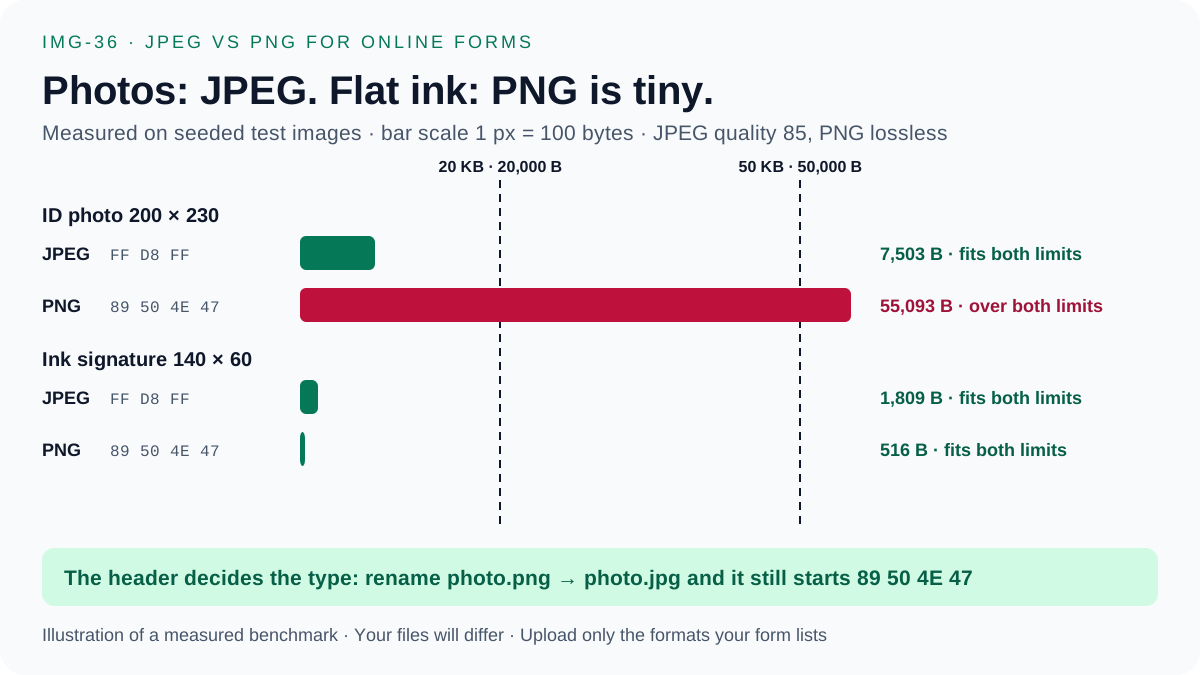
Use JPEG: 7,503 bytes fits. Lossless PNG is 55,093 bytes — over the 20,000-byte limit — because continuous-tone photo pixels barely compress without loss.
Portals read the first bytes of the file, not its name. A PNG renamed to .jpg still starts with 89 50 4E 47 and can be rejected; a real JPEG starts with FF D8 FF. Re-encode instead of renaming. Measured on seeded test images (JPEG quality 85, lossless PNG, WebP quality 80).
Frequently Asked Questions
Why is JPEG smaller than PNG for passport and exam photos?
Camera photos contain thousands of smooth colour gradients. Lossless PNG stores every pixel change, so a 200 × 230 px ID photo measures 55,093 bytes as PNG versus 7,503 bytes as JPEG at quality 85 on our seeded test fixture.
Why does renaming photo.png to photo.jpg fail on upload portals?
Upload validators inspect the first bytes of the file (the magic number), not the filename extension. A PNG still begins with 89 50 4E 47 after renaming; a real JPEG must begin with FF D8 FF.
When is PNG smaller than JPEG?
Flat ink signatures and simple logos with few colours compress well in lossless PNG (516 bytes vs 1,809 bytes for our 140 × 60 px signature fixture). Still upload JPG if the form asks for JPG or JPEG only.
What happens to PNG transparency when I convert to JPEG?
JPEG has no alpha channel. This website composites transparent pixels onto a solid white (#FFFFFF) background before encoding JPEG so signatures and ID graphics do not turn black.